Better Analyst for enterprise teams
AI analysis your security team can sign off on.
SAML single sign-on, SCIM provisioning, enforced two-factor authentication, data access rules on every source, and an audit log of every change. On the Business plan, with the price on the page.
Identity, start to finish
Your identity provider decides who gets in.
Better Analyst follows your directory from the first day to the last, so IT never maintains a second list of users.
- Day 1
Connect your identity provider
Prove you own your email domain with a DNS record, paste your SAML metadata from Okta, Microsoft Entra ID, or Google Workspace, and run a test sign-in.
- Every hire
People arrive already provisioned
SCIM creates the account and adds the person to your team. They sign in through your identity provider, with your MFA policy.
- Every day
Every change is on the record
Sign-ins, role changes, new data sources, data access rule edits, and published dashboards land in the audit log.
- Last day
Access ends when they leave
Deactivate them in your identity provider. Their seat is released, their sessions end, and their shared work stays with the team.
Team audit log
When someone asks who changed it, you have the answer.
Owners and admins can filter every sign-in, member change, data source change, data access edit, share, and export by person, activity, and date, then export it to CSV for your reviews. Entries can't be edited or deleted.
| Time | Person | Activity |
|---|---|---|
| 09:02 | maria@example.com | Signed in with SSO |
| 09:14 | dev@example.com | Changed data access rulesData source: Finance warehouse |
| 09:31 | Identity provider | Provisioned a memberMember: sam@example.com |
| 10:05 | maria@example.com | Made a dashboard publicDashboard: Q3 pipeline |
Per-member data access
One connection. Each person sees their own data.
Set attributes like region or department for each member, then write rules that read from them. Rows, tables, and columns are filtered for whoever is asking, in chat and on dashboards.
- Row rules take their value from each member's attributes, so a rep in the West sees only West rows
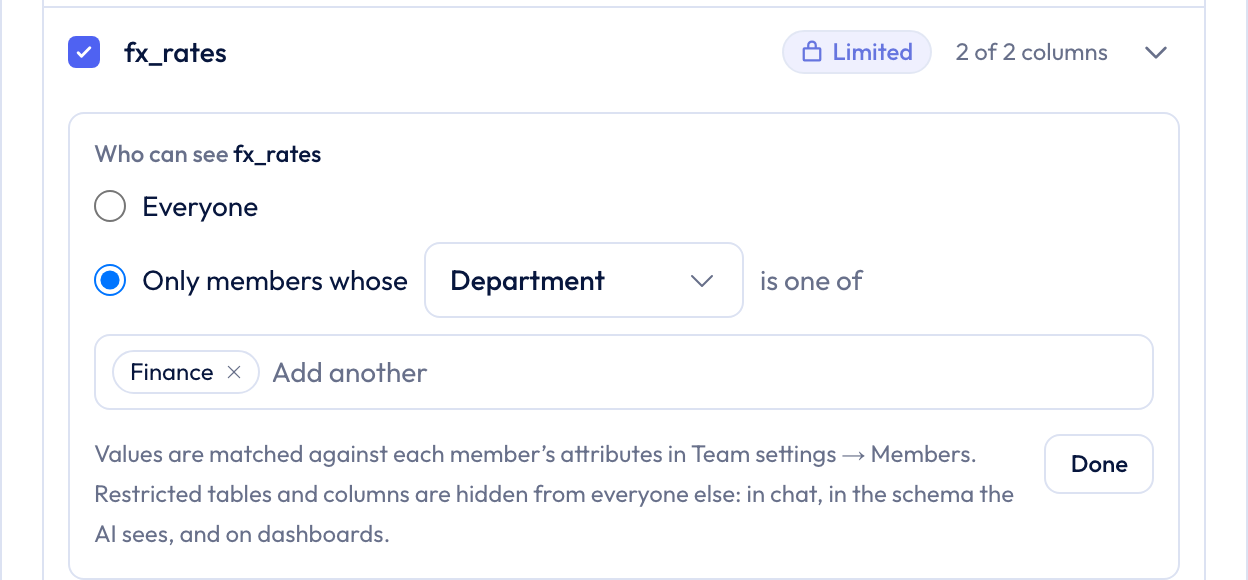
- Hide a table or column from everyone except the members whose department, region, or client matches
- A chat that uses the source is visible only to the person who ran it, and can't be made public or shared
- One dashboard for the whole team, where each viewer sees their own numbers. Public links, embeds, and schedules stay off for it
- Preview as member shows the filters and hidden tables any person would get, before you save
- Access managers look after one source's rules without being team admins, and their edits are in the audit log
Controls
Set it once. It applies to every chat, dashboard, and export.
Sign-in on your terms
- SAML 2.0 single sign-on with any identity provider
- Require SSO for everyone on your verified domains
- Require two-factor authentication for password and Google sign-ins
- The same rules apply in the Excel add-in and the ChatGPT plugin
- The team owner keeps a recovery path with password plus two-factor
Data access per source
- Choose which tables and columns the AI can read on each connection
- Row filters that apply to every question asked of that source
- Signed per-user scopes for embedded analytics chat
- Credentials encrypted by a dedicated AWS encryption service
Answers your analysts agree with
- Data Context: shared metric definitions the AI uses before it writes a query
- Verified metrics that admins approve
- Analysis code runs in an isolated sandbox for every chat
- Your data is not used to train AI models
Pricing
No six-month rollout. No six-figure quote.
Most BI platforms that offer these controls sell them after a sales cycle and expect a warehouse and a modeling team before anyone gets an answer. Better Analyst connects to the sources you already use and is ready the same day.
- Business plan
- $80 per user per month, or $56 billed yearly
- Included
- SSO, SCIM, verified domains, enforced two-factor, audit log, data access rules, per-member data access
- Sources
- Snowflake, BigQuery, PostgreSQL, MySQL, SQL Server, GA4, Search Console, Google Sheets, Airtable, Tableau, and more
- Custom contracts
- Volume pricing, annual invoicing, and security reviews
Questions
What security reviews ask first.
Bring your security questionnaire. We'll bring the answers.
Tell us about your team and your requirements, or book a walkthrough with the founder.